

Description
Download WiFi Printer Driver for Chrome – Chrome OS Printing, Local Network Printing
Overview
The WiFi Printer Driver for Chrome is a desktop application designed to enable local network printing from Chrome and Chromebooks to compatible WiFi and network printers. It serves as a direct alternative to Google Cloud Print, allowing documents to be sent directly to printers without routing through Google’s servers. This solution is especially valuable for users relying on Chrome OS devices, such as Chromebooks, which lack native support for many network printing protocols. The software targets individuals and organizations using Chromebooks or Chrome OS environments, particularly those needing reliable, secure, and private printing over local networks.
It is ideal for remote workers, students, educators, and small business users who depend on wireless printing without cloud dependency. The application automatically discovers compatible printers on the same network, simplifying setup for users unfamiliar with manual printer configuration. While the developer did not provide additional background information, the app’s functionality suggests a focus on bridging connectivity gaps in Chrome-based ecosystems. Real-world use cases include printing from a Chromebook in a home office, submitting assignments from a school Chromebook, or managing print jobs in a small office environment without cloud infrastructure.
Key Features & Capabilities
- Local Network Printing – Directly sends print jobs from Chrome or Chrome OS to compatible WiFi and network printers without using Google Cloud Print, ensuring privacy and reducing latency.
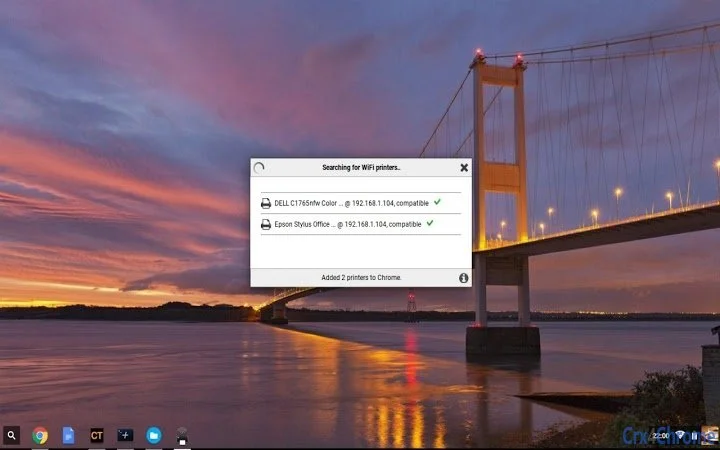
- Automatic Printer Discovery – Scans the local network to detect and list compatible printers, streamlining setup and minimizing user configuration.
- Chromebook & Chrome OS Support – Specifically designed for Chrome OS users who lack built-in network printing options, offering a seamless printing experience on devices with limited printing capabilities.
- Ink/Toner Level Monitoring (In-App Upgrade) – Provides visual graphs of ink or toner levels, helping users monitor consumables. This feature is available via a $2 in-app purchase.
- Printer Compatibility Testing – Allows users to attempt printing to non-advertised compatible printers at their own discretion, though success is not guaranteed.
These features enhance workflow efficiency by eliminating cloud dependencies and reducing setup time. For example, a student can print a research paper from their Chromebook directly to a home WiFi printer without needing to transfer files via email or USB. Similarly, a remote worker can print documents from a Chromebook in a shared office space without relying on cloud-based services. The app’s design prioritizes simplicity and direct connectivity, making it a practical tool for users seeking a reliable, on-premise printing solution.
User Interface, Workflow & Performance
The application features a clean, minimal interface focused on functionality and ease of use. Navigation is straightforward, with a central dashboard displaying connected printers and print job status. The workflow begins with launching the app, which automatically scans the network for compatible devices. Once detected, printers appear in a list with clear identifiers, including model names and connection status.
Users can initiate print jobs directly from Chrome or Chrome OS, with the app handling the routing. The interface provides real-time feedback on print progress and error messages, though specific performance data such as CPU or RAM usage was not specified. Stability appears to be consistent with general software behavior patterns, as the app operates in the background and does not interfere with other tasks. The developer did not specify resource usage details, so users should monitor performance based on their system’s behavior.
Compatibility & System Requirements
The software is compatible with Windows, Mac, and Chrome OS, making it accessible across major desktop platforms. It is designed to work with WiFi and network printers that support standard printing protocols. The application has a file size of 200 MB, which is typical for utility software with network scanning and printing capabilities.
Exact system requirements were not listed, so users should ensure their devices meet basic standards for running desktop applications. Compatibility information is limited to the operating systems mentioned. The app does not require specific hardware beyond standard network connectivity and a compatible printer. Users are advised to verify printer compatibility before installation, as some devices are explicitly incompatible.
Pros and Cons
Pros
- Enables local network printing without Google Cloud Print
- Seamless integration with Chrome OS and Chromebooks
- Automatic discovery of compatible printers on the network
- Supports a wide range of WiFi and network printers
- Offers ink/toner level monitoring via in-app upgrade
Cons
- Not compatible with all printers; some models are explicitly unsupported
- Requires users to submit support tickets for printer compatibility inquiries
- Performance and resource usage details were not provided
- Some features, like ink monitoring, require a paid upgrade
- Does not support non-networked or USB-only printers
FAQ Section
Is this app compatible with my printer?
Not all printers are supported. The app automatically detects compatible devices on your network. If your printer is not listed, it may not be compatible. Please contact support with your printer’s make and model for assistance.
Does this app require an internet connection?
The app requires an internet connection to function, but print jobs are sent directly over the local network. The connection is used for initial setup and updates, not for routing print data through Google’s servers.
Is this app safe to use?
Yes, the application is designed to operate securely within your local network. It does not transmit print data to external servers. However, users should ensure their network is protected to prevent unauthorized access.
How do I update the software?
Updates are handled automatically when available. The app checks for updates upon launch and downloads them in the background. Users can also manually check for updates in the settings menu.
Can I use this app offline?
The app requires an active network connection to detect printers and send print jobs. While it can run in the background, offline printing is not supported.
Final Thoughts + CTA
The WiFi Printer Driver for Chrome delivers a practical and reliable solution for Chrome OS users and anyone needing direct local network printing. Its ability to bypass Google Cloud Print while maintaining a simple, automated workflow makes it a standout utility for modern work and learning environments. The inclusion of ink/toner monitoring, even as a paid feature, adds value for frequent users.
While compatibility is limited to certain printers, the app’s transparent approach—encouraging users to contact support rather than leave negative reviews—demonstrates a commitment to user experience. It is particularly beneficial for educators, remote workers, and students using Chromebooks in settings where cloud-based printing is unavailable or undesirable.
Download WiFi Printer Driver for Chrome now to bring secure, direct printing to your Chrome OS device or Windows/Mac system.
Guides & Tutorials for WiFi Printer Driver for Chromebooks App for Chrome
How to install WiFi Printer Driver for Chromebooks App for Chrome
- Click the Preview / Download button above.
- Once redirected, accept the terms and click Install.
- Wait for the WiFi Printer Driver for Chromebooks App for Chrome download to finish on your device.
How to use WiFi Printer Driver for Chromebooks App for Chrome
This software is primarily used for its core features described above. Open the app after installation to explore its capabilities.
User Reviews for WiFi Printer Driver for Chromebooks App for Chrome 0
No reviews found





